Mastering the Vintage Signature Text Effect: A Comprehensive Guide to Scalable, Editable Vector Art
In the rapidly evolving world of digital design, there is a timeless allure to vintage aesthetics. Whether you are designing a retro brand identity, creating nostalgic marketing materials, or simply adding a touch of classic elegance to a personal project, the vintage signature text effect stands out as a versatile and powerful tool. This specific graphic style mimics the organic flow of handwritten ink on aged paper, offering a human touch that standard computer fonts often lack.
Today, we explore the ins and outs of this popular design element. We will discuss why it is a favorite among professionals, how modern technology has made these assets easier than ever to use, and exactly what makes a high-quality vintage signature text effect file so valuable for your creative workflow. From understanding its purpose in branding to learning how to edit it effortlessly in Adobe Illustrator, this guide covers everything you need to know.
What Exactly Is a Vintage Signature Text Effect?
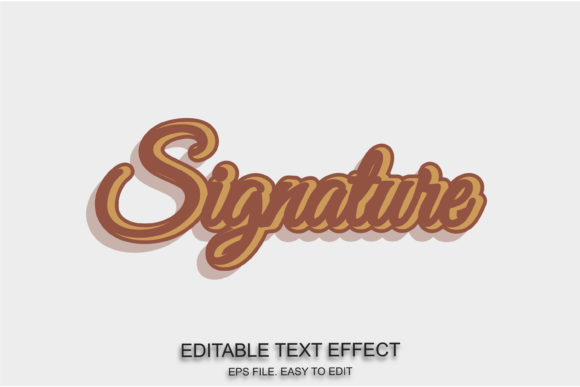
At its core, a vintage signature text effect is a vector-based graphic representation of handwriting. Unlike raster images (like JPEGs or PNGs) which can become pixelated when enlarged, these effects are built using mathematical paths. This means they retain their crisp edges regardless of size. The "vintage" aspect comes from the stylistic choices inherent in the design: slightly irregular lines, varying stroke widths, and textures that simulate the imperfections of old fountain pens or quills.
These designs are not just static images; they are dynamic templates. When designers speak of an easy-to-edit vintage signature text effect, they refer to files where every letter, curve, and flourish is separated into individual editable components. This allows users to change the content, adjust the spacing, modify colors, and even alter the shape of individual strokes without losing quality.
The Power of Scalability and Flexibility
One of the most significant advantages of using vector-based signature effects is their 100% scalability. Imagine needing to print a logo on a small business card and then scaling that same design up for a massive billboard. With a standard image file, the quality would degrade instantly. However, with a scalable EPS file or an AI document, the design remains razor-sharp at any dimension.
This flexibility extends to customization. In many premium resources, you will find that the font used is not locked. Instead, the design is constructed using the actual font characters available in your system or pre-installed within the file. This means you can:
- Change the text: Replace "John Doe" with any name or phrase you desire.
- Modify the color: Switch from traditional black ink to gold foil, deep blue, or vibrant red to match your brand palette.
- Adjust the weight: Make the signature thicker or thinner by manipulating the stroke properties.
Why Designers Are Moving Away from Static Images
In the past, obtaining a unique signature look required either hiring a calligrapher or manually drawing each letter in software like Adobe Illustrator. This process was time-consuming and expensive. Today, the availability of free font used in conjunction with vector graphic styles has democratized high-end design.
However, not all free downloads are created equal. A common misconception is that all vector files are equally easy to work with. Many low-quality downloads come as "grouped" objects, making it difficult to isolate specific letters. A truly useful vintage signature text effect should be fully ungrouped and organized, allowing for granular control. This level of detail ensures that the final output looks professional and bespoke, rather than generic and mass-produced.
Practical Applications in Modern Business
How does this fit into the real world? The applications are vast and span across various industries:
- Branding and Logos: Small businesses and startups often use vintage signatures to convey trust, heritage, and authenticity. A hand-written style suggests that a real person stands behind the product, fostering a deeper emotional connection with customers.
- Marketing Materials: Invitations, certificates, and limited-edition packaging benefit greatly from this aesthetic. It adds a layer of exclusivity and craftsmanship that flat, sans-serif fonts cannot achieve.
- Social Media Content: In an era of algorithm-driven feeds, visual uniqueness is key. A vintage signature overlay can transform a plain photo into a shareable piece of art, increasing engagement rates.
- Educational Resources: Teachers and educators can create engaging worksheets, certificates of achievement, and historical documents that feel authentic and visually stimulating.
Technical Specifications: What You Need to Know
When searching for the right asset, it is crucial to understand the technical requirements. Most high-quality vintage signature packs are delivered in formats compatible with industry-standard software. Specifically, you will often see references to Min AI CC Fonts and Eps File compatibility.
Adobe Illustrator Compatibility: The primary format for these designs is usually Adobe Illustrator (.AI). Files designed for CC (Creative Cloud) versions ensure that you have access to the latest features, such as variable fonts and advanced gradient meshes. However, it is important to check the version number; a file saved in a very recent version might not open in older software without conversion.
The Role of EPS Files: The Encapsulated PostScript (EPS) format is another staple. EPS files are universally recognized and can be opened in almost any vector graphics editor, including CorelDRAW, Affinity Designer, and Inkscape. They are particularly useful for print workflows because they carry high-resolution data that printing presses require.
Font Customization: A key feature of a superior template is the ability to change fonts according to taste. Some designs come bundled with specific typefaces, while others are built using standard system fonts. If a file uses custom fonts, it should ideally include a link to download them or instructions on how to substitute them with similar ones available in your library. This ensures that your design remains intact even if you don't own the exact original font.
How to Use and Edit These Effects Effectively
Using a 100 editable vintage signature effect is straightforward once you understand the basic tools in Adobe Illustrator. Here is a simple workflow to get started:
Step 1: Open the File
Launch Adobe Illustrator and open your downloaded .AI or .EPS file. Ensure that the layers panel is visible to see how the elements are organized.
Step 2: Select the Text
Use the Selection Tool (V) to click on the text you wish to change. If the text is still a live object, you can simply type over it. If it is converted to outlines (paths), you may need to use the Direct Selection Tool (A) to select individual anchor points and reshape them.
Step 3: Apply Color and Style
With the text selected, head to the Swatches panel. You can apply any color from your current document's palette. For a true vintage look, try using muted earth tones, sepia, or metallic gradients. You can also add texture overlays by placing a scanned paper texture beneath the signature layer.
Step 4: Fine-Tune the Details
Don't be afraid to experiment. Adjust the kerning (space between letters) to make the signature look more natural. Sometimes, slightly tilting the entire group or warping it can enhance the hand-drawn illusion.
Common Misunderstandings About Vintage Design
As we embrace these tools, it is helpful to clarify a few myths. First, vintage does not mean outdated. In fact, combining modern layouts with vintage typography creates a trendy "retro-modern" aesthetic that is currently dominating fashion and lifestyle brands. Second, there is a belief that these effects are only for "old-fashioned" topics. On the contrary, a well-executed signature can add sophistication to tech blogs, modern furniture catalogs, and contemporary art portfolios.
Another assumption is that free resources are always low quality. While true for some, there are countless free font used libraries and community-shared assets that offer professional-grade results. The key is to verify the source and ensure the file is fully editable before downloading.
Conclusion: Elevate Your Creativity Today
The vintage signature text effect is more than just a decorative element; it is a bridge between the past and the present, offering a sense of humanity in a digital age. With its 100 scalable nature and full editability, it provides designers and hobbyists alike with the freedom to create unique, personalized content without the steep learning curve of manual illustration.
Whether you are looking to create a stunning logo, design a wedding invitation, or simply enjoy the art of typography, these vector assets are an invaluable addition to your toolkit. By choosing high-quality files compatible with Min AI CC and standard Eps File formats, you ensure that your projects remain flexible and professional. So, go ahead, experiment with different styles, change the fonts to suit your taste, and enjoy the endless possibilities of vintage design.
Remember, the best designs are those that tell a story. Let a vintage signature help yours speak louder and clearer.