Unlocking the Sweetest Look in Design: A Deep Dive into the Text Effect - Honey Text Style
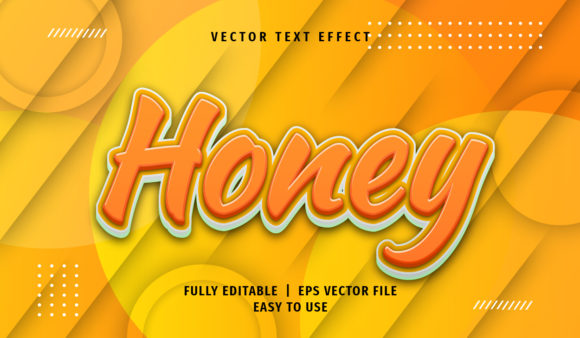
In the fast-paced world of graphic design, finding a way to make typography stand out without cluttering the visual space is an art form. Whether you are crafting a vibrant social media post, designing a high-end print brochure, or creating a web banner that needs to grab attention instantly, the right text effect can be the difference between a forgettable project and a memorable one. This is where the Text Effect - Honey Text Style comes into play. It is not merely a preset; it is a versatile tool designed to add depth, gloss, and a unique texture to your lettering, mimicking the rich, viscous quality of honey.
This specific text effect is built for Adobe Illustrator, a staple in the creative industry. Its primary strength lies in its adaptability. You aren't locked into a single look. Instead, you have the freedom to integrate this style into print, web, or any other digital project with ease. The beauty of this resource is that it simplifies complex vector editing, allowing designers of all skill levels to achieve professional results with just a few clicks.
Seamless Integration with Adobe Illustrator Workflows
One of the most significant hurdles designers face when adopting new assets is compatibility and workflow disruption. Does the file work with my version of software? Do I need to install complex plugins? With the Honey Text Style, these concerns are effectively eliminated. The product is fully compatible with Adobe Illustrator CS6 and later versions, ensuring that modern creatives can use it without compatibility headaches.
The interface is designed for speed. You do not need to manually rebuild layers or trace vectors. The process is streamlined through the Graphic Styles panel. By simply clicking on the graphic style feature within Adobe Illustrator, you can apply the honey texture to your selected text immediately. This instant application allows you to visualize the impact on your design in real-time. If you prefer a more hands-on approach, the effect also allows you to directly change the text attributes. This flexibility means you can tweak the font, size, or spacing while maintaining the signature honey gloss and texture.
For those who are cautious about missing fonts, this tool offers a clever workaround. When you open the EPS or AI format file, you can click the text effect to identify the specific name of the font used in the "character" panel of Adobe Illustrator. Even if you haven't installed that particular font on your machine, the panel will display the name, giving you the exact reference needed to locate and install it elsewhere. This transparency removes the guesswork often associated with downloading third-party design resources.
Technical Specifications and File Organization
Understanding the technical backbone of a design asset is crucial before integrating it into a commercial project. The Text Effect - Honey Text Style comes packaged with robust specifications that cater to both immediate use and long-term scalability. The core files are provided in AI (Adobe Illustrator) and EPS formats. These are the gold standards for vector graphics, ensuring that your designs remain crisp regardless of how large they are printed or how closely a user zooms in on a screen.
The product includes an image preview in JPG format, which serves as a quick reference guide. This allows you to see the final aesthetic outcome without needing to open the heavy vector files every time you want to check the look. However, the true power lies in the source files. They are described as fully editable, meaning every element from the gradient overlays to the shadow depths can be manipulated to suit your brand guidelines.
- 100% Scalable: Because the underlying structure is vector-based, the honey texture maintains its integrity at any resolution, from a business card to a billboard.
- Well-Organized Layers: One of the most frustrating aspects of downloaded templates is messy layer structures. This product avoids that pitfall by keeping layers logical and grouped. You can easily isolate the text layer, the background glow, or the texture overlay to make adjustments without affecting the rest of the composition.
- Easy to Use: The interface logic follows standard Illustrator conventions, making the learning curve negligible even for beginners.
Practical Applications Across Industries
The versatility of the Honey Text Style extends far beyond simple decoration. Its warm, golden, and slightly translucent appearance makes it particularly effective in industries where sweetness, luxury, or organic qualities are key themes.
Consider the food and beverage sector. For a bakery promoting their latest line of artisanal pastries, using this text effect on a menu or a flyer can subconsciously evoke the taste of fresh honey. The glossy finish mimics the viscosity of the product itself, creating a sensory connection with the viewer. Similarly, for cosmetic brands selling lip balms or skincare products with natural ingredients, the honey aesthetic aligns perfectly with marketing messages about purity and hydration.
In the realm of web design, this effect adds a touch of elegance to headers and call-to-action buttons. Unlike flat text, which can sometimes feel sterile, the honey style introduces a tactile quality that invites interaction. On mobile devices, where space is at a premium, a well-executed text effect like this can convey a lot of information visually without requiring additional imagery. The ability to scale the effect ensures that it looks sharp on high-resolution Retina displays, which is a critical factor for modern web performance.
Print projects benefit immensely from the high-quality vector nature of the file. Whether you are designing packaging for a local craft store or creating a poster for a music festival, the Text Effect - Honey Text Style provides a level of polish that usually requires hours of manual shading and blending. The organized layers allow print designers to adjust color modes or opacity settings to ensure the final output matches the desired CMYK profile for offset printing.
Why Choose Vector-Based Text Effects?
Before adopting this specific style, it is worth understanding why vector-based text effects are superior to raster-based filters found in photo editing software. Raster images rely on pixels, which become blurry and pixelated when scaled up. In contrast, the Honey Text Style uses mathematical paths. This means you can resize your text from a small logo to a massive storefront sign, and the honey texture will remain perfectly smooth.
This characteristic is essential for businesses that require multi-format consistency. A brand might need a small icon for a favicon, a medium-sized logo for social media, and a large-scale banner for a trade show. Using a vector asset like this ensures that the brand identity remains cohesive across all touchpoints. Furthermore, because the file is editable, you can experiment with different color palettes. While the default honey color is warm and inviting, changing the fill to a deep amber or a bright yellow can shift the mood entirely, making the same effect suitable for a wider range of projects.
Optimizing Your Creative Process
Efficiency is the currency of the design world. The Text Effect - Honey Text Style is engineered to save time. Instead of spending twenty minutes adjusting gradients, drop shadows, and blend modes to create a glossy, textured look, you can apply the effect in seconds. This efficiency frees up mental energy to focus on broader strategic decisions, such as layout, hierarchy, and overall concept development.
The direct edit capability mentioned earlier is a game-changer for collaborative workflows. If a client requests a change in font or a slight adjustment to the color scheme, you don't need to start over. You simply select the text object, access the character panel to swap the font, and watch the honey effect adapt instantly. This responsiveness builds trust with clients and speeds up the revision cycle.
Furthermore, the inclusion of the font name in the character panel acts as a helpful educational tool. It encourages designers to explore new typefaces. Often, the recommended font for a specific effect is chosen because its shape interacts best with the texture. Discovering this font can expand your typographic library and improve your future design choices.
Making the Right Choice for Your Project
When evaluating design resources, professionals look for reliability, quality, and flexibility. The Text Effect - Honey Text Style scores highly on all three fronts. It is not a gimmick; it is a functional tool that solves the common problem of creating attractive typography quickly. The fact that it works seamlessly with AI CS6 and EPS formats ensures backward compatibility for studios that may still be running older software versions, while the full editability guarantees forward compatibility for future updates.
Whether you are a seasoned graphic designer looking to streamline your workflow or a small business owner creating your own marketing materials, this text effect offers a practical solution. It bridges the gap between amateur aesthetics and professional polish. By leveraging the power of Adobe Illustrator's graphic styles and the inherent flexibility of vector graphics, you can produce work that stands out in a crowded marketplace.
Ultimately, the goal of any design project is communication. The Honey Text Style enhances that communication by adding visual interest and emotional resonance. It turns simple words into compelling visuals that draw the eye and hold attention. With its easy-to-use interface, comprehensive file organization, and 100% scalability, it represents a smart investment for anyone serious about elevating their design output.